






InSyte: AP Automation
From invoice email to voucher. No vendor templates. Works with non-PO. InSyte reads incoming invoices, matches them against purchase orders and receipts, coordinates approvals, and creates vouchers directly in your SyteLine ERP.
Request a Demo40 years of SyteLine expertise built-in.
Every PO-backed invoice is matched against its receipt. Non-PO taken on instruction
You can choose to switch to shadow mode and see what your agents do before enabling automation.
Every change is logged with a full audit trail.

From Invoice Email to ERP Voucher
Rather than manually opening invoices, entering data, matching purchase orders and receipts, and chasing approvals, let InSyte handle the process.
InSyte reads invoice headers and line items, validates them against purchase orders and receipts, routes invoices to the appropriate approvers, and creates the voucher with the original PDF attached once approved. Your AP team focuses on exceptions rather than routine data entry and follow-up.
Set the rules, and InSyte follows them
InSyte automates AP from invoice intake to matching, approvals, and voucher creation in SyteLine. The AP Console gives your team one place to review invoices, resolve exceptions, access source documents, and track every change from intake to completion.

 Forward
 Read
 Match & Approve
 Voucher
Vendors email invoices to your existing AP mailbox, where they're automatically forwarded to your custom InSyte address. Only allowed senders start automations. This protects company information, blocks unauthorized invoices, and prevents wasted tokens.

InSyte interprets invoices the same way your team would, capturing invoice header and line details, including freight, tax, and miscellaneous charges.
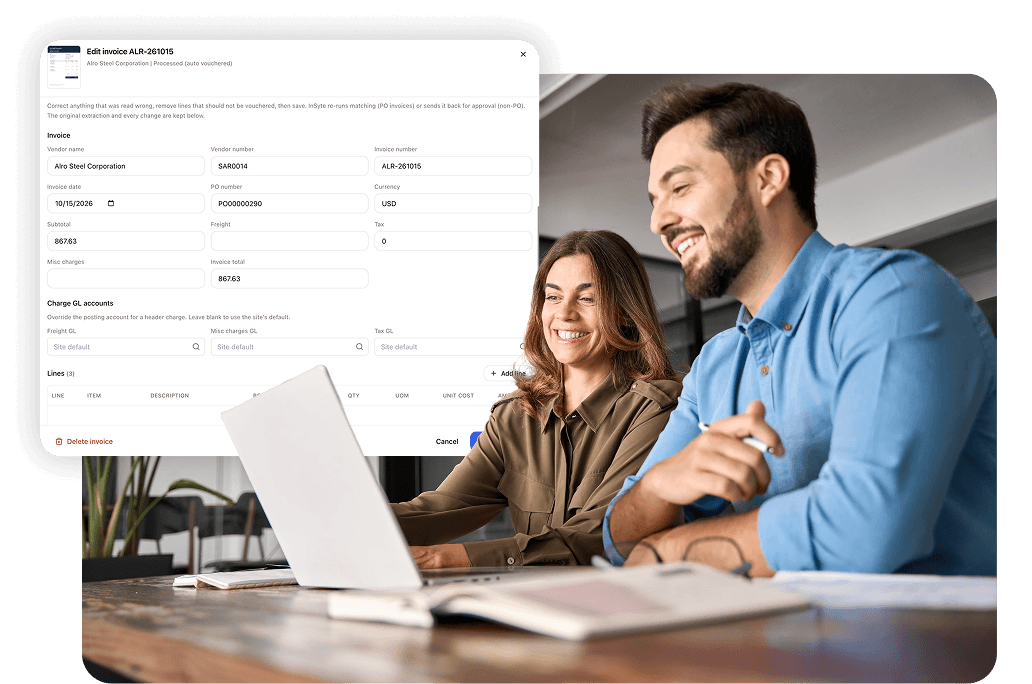
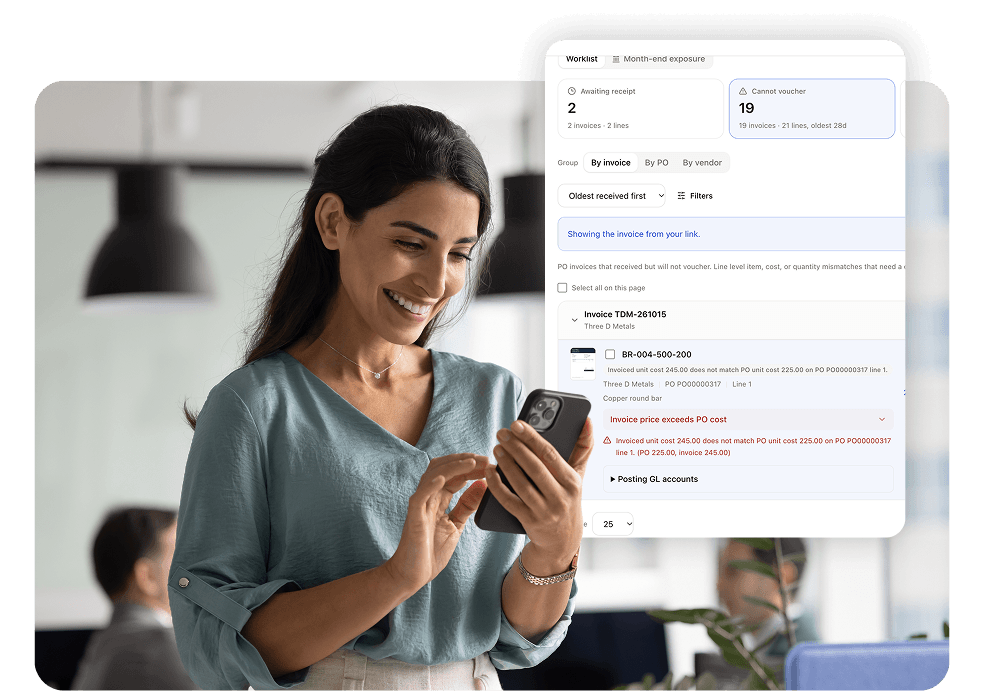
Invoices with a PO are matched against the purchase order and receipt. If goods haven’t arrived, matching waits for receipt instead of flagging an exception. You don't need complex SyteLine approvals. Instead, use InSyte to quicly create approval rules by dollar amount, vendor, or purchase type. Invoices that meet your auto-approval criteria proceed without manual review.
Once approved, the invoice is created as a voucher in SyteLine with the PDF attached, and every change is logged for full traceability.
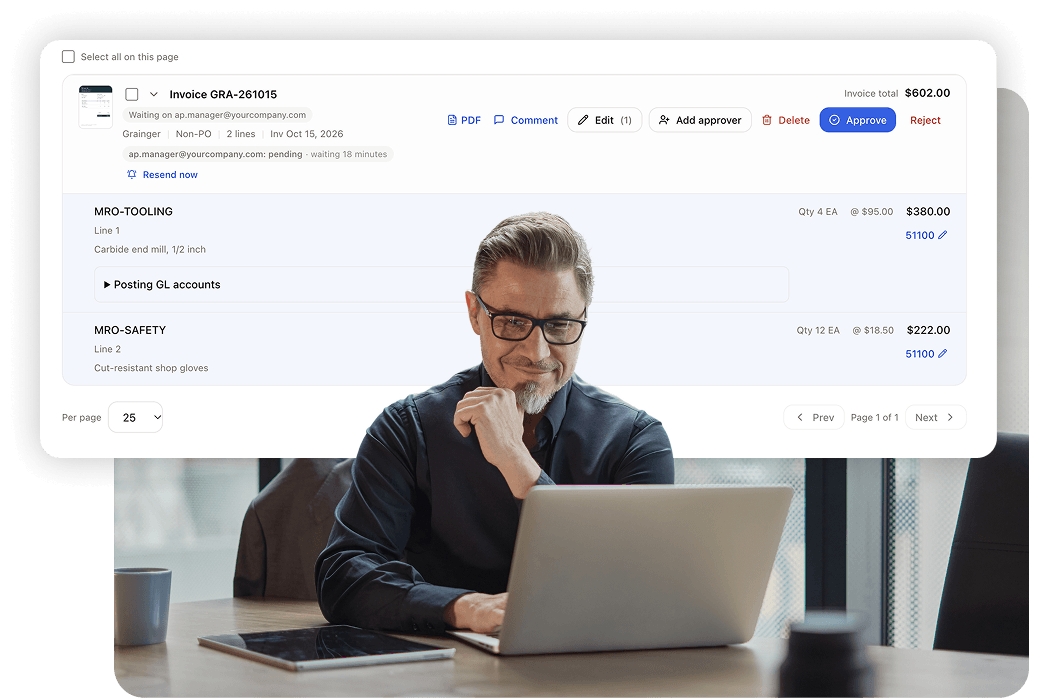
InSyte Simplifies AP Automation
-
Match Invoices to What’s Received
InSyte matches invoices against purchase orders and receipts. If an invoice arrives before the goods, it waits in the Awaiting Receipt queue rather than being flagged as an exception. When the goods are received, matching resumes.
-
Automate With Clear Rules
Set explicit rules for which invoices can be processed automatically, including vendor or purchase type instructions and optional amount limits. Required approvals take priority, while mismatches and potential duplicates stop for review.
-
Manage Every Invoice in One Console
See what needs attention in one AP Console, with queues for invoices awaiting receipt, exceptions, and pending approval. Open an invoice to view its source PDF alongside extracted data, edit GL accounts, and reprocess changes with a full audit trail.
-
Customize Workflows by Site
Configure separate AP workflows for different sites, or run multiple workflows at one site. Each InSyte email address runs its assigned workflow, with its own rules for invoice processing and approvals.
Product Brochure: AP Automation
Learn how InSyte handles AP from invoice data capture and PO and receipt matching to approval routing and voucher creation directly in SyteLine.
AP Automation FAQs
View answers to common questions about email intake, reading and matching, approvals, posting, and more.
Frequently Asked Questions
What is InSyte?
InSyte by Decision Resources is a platform of AI agents that support your routine ERP work within Infor SyteLine.
Think of it as a co-worker that supports your team by automating work and improving accuracy and efficiency.
InSyte reads emailed invoices and customer POs, checks them against your ERP, creates the vouchers and orders, and answers questions from live ERP data, all under the rules and approvals you set.
InSyte was built on 40+ years of manufacturing experience and a deep understanding of Infor SyteLine.
Which ERP systems does InSyte work with?
InSyte is built for Infor CloudSuite Industrial and Infor SyteLine version 9.01 and later.
Can we try it before it writes to SyteLine?
Yes. Run the workflow in shadow mode. InSyte reads and matches your real invoices and shows you the vouchers it would create, and writes nothing to SyteLine or Infor CloudSuite Industrial until you turn that on.
Do vendors have to change how they send invoices?
No. Vendors can keep sending invoices to your existing AP mailbox. Your IT team sets up automatic forwarding to your custom InSyte address. Vendors can also email that address directly if you prefer.
What happens when an invoice does not match?
It goes to Exceptions: no matching PO line, a cost or item mismatch, or a possible duplicate.
Who can approve, and how many approvers can I require?
You pick approvers from your InSyte users. More than one approver can be required. Everyone must approve, and one rejection rejects the invoice.
Is AP automation email based?
Yes. Vendors send invoices to your existing AP mailbox, which your IT team automatically forwards to your custom address on invoices.syteline.app. You choose the allowed senders and the workflow it runs. Direct email to the InSyte address is also supported.
What happens if someone who is not an allowed sender emails the address?
Nothing starts. No automation runs, which protects your company information, blocks unauthorized invoices, and spends no tokens.
Can I run different AP workflows?
Yes. Each address runs the workflow you select for it. Different addresses can run different AP workflows, different sites can have their own, and one site can run several.
What invoice formats are accepted?
Any (information in the body of an email, Word Document, Excel Sheet, and more). InSyte takes all inputs and formats information into a standardized PDF format that is saved into SyteLine or IDM.
What does InSyte read from an invoice?
The header (vendor, invoice number, dates, and PO), every line item, and the freight, tax, and misc charges that sit outside the lines.
What if one PDF holds several invoices?
A PDF scan that holds several invoices is split into separate invoices.
Does every invoice need a PO?
No. Invoices with a PO are matched to the PO and the receipt. For invoices with no PO, such as utilities, an explicit auto-approval rule can allow automatic processing. Required approvers and exceptions still take priority.
Are credit card statements supported?
Yes. When SyteLine receives a credit card statement, it automatically generates line items.
What if the invoice arrives before the goods do?
It waits in Awaiting receipt. It matches on its own once the goods arrive, so your team sees real exceptions, not timing ones.
How do I configure invoice approvals?
Configure approval rules on each AP workflow. A specific approver is required when the invoice reaches their dollar threshold or matches their plain-English instructions for a vendor or type of purchase. Auto-approval has its own instructions and optional maximum amount.
Can an approver approve from the email?
No. The email carries a Review in InSyte link, and approval happens in InSyte after the approver logs in.
Can invoices be processed without manual approval?
Yes. An invoice must match an auto-approval rule and be below its maximum amount, if one is set. Non-PO invoices require explicit instructions. A specific approver rule takes priority, and exceptions still stop for review. Processed invoices and their audit trails remain visible in the AP Console.
Where do I see what is waiting?
In the AP Console, every invoice sits in the queue that matches where it stands: Awaiting receipt, Exceptions, or Pending approval. Approved and Rejected invoices stay as a permanent record.
Can I fix a GL account or a misread?
Yes. GL accounts are editable right on the invoice. Save your edits and re-process. A full audit trail records every change.
What can I see after the fact?
Approved and Rejected invoices stay as a permanent record, the source PDF is one click away, and every change is logged. Save & Reprocess keeps a full audit trail.
Does it create vouchers in SyteLine or Infor CloudSuite Industrial?
Yes. When an invoice is approved, InSyte creates the voucher in SyteLine, either posted or left unposted for your team’s review, based on your workflow setting. Every change along the way is logged.
Can we open the invoice from the voucher in SyteLine?
Yes. InSyte attaches the invoice PDF to the voucher, so your team can open it right from SyteLine without logging in to InSyte. Sites using Infor IDM get it filed in IDM.
How is InSyte priced?
One annual platform. One license covers your whole team, so add approvers and reviewers as you need them. Contact Decision Resources for an itemized quote.
How is InSyte different from just connecting an LLM (Claude, ChatGPT, Copilot) to SyteLine directly?
Connecting an LLM directly to your ERP may give you a starting point, but it doesn’t give you a complete, secure solution for working with ERP data and processes. InSyte is purpose-built for SyteLine and CloudSuite Industrial, with the following advantages:
- Built-in ERP knowledge: InSyte has thousands of SyteLine IDOs already mapped, saving months of development work. It uses SyteLine’s own business logic to interact with your ERP rather than bypassing it with direct database writes.
- Security and user-level permissions: InSyte respects each user’s existing SyteLine permissions, so users can only access the data they’re authorized to see. Administrators can also control access to InSyte modules, such as AP Automation, on a user-by-user basis.
- Controlled ERP changes: Users can review and confirm changes before they’re committed to the ERP. Every change is logged, and administrators control write access down to the individual IDO.
- Managed AI usage and costs: InSyte is optimized for token efficiency, with visibility into consumption by user and the ability to set individual usage limits.
- Ready-to-use functionality: InSyte includes built-in workflows like AP Automation and Sales Order Automation. Customers are already processing real invoices through the platform. You’re getting working business applications, not just an AI connection that still needs to be developed into a solution.
In short, InSyte brings together the ERP knowledge, security, controls, and ready-to-use functionality needed to put AI to work in your everyday business processes.